The best keyboards for work balance a comfortable layout with the connections and controls your daily tasks need. These picks range from quiet, full-size wireless boards to compact mechanical options, so consider your number-pad needs, desk space, device switching, and typing noise.
Quick Top Products
JLab Epic Wireless Keyboard

- It has 108 full-size backlit keys and a media knob.
- Bluetooth 5.2 pairs with up to three devices, with a dongle option.
- Soft-touch keys and a metal base are designed for desk use.
Best For: People who want a full numeric layout, low-light visibility, and controls for several devices.

SteelSeries Apex 3

- Whisper-quiet switches are specified for near-silent use.
- The magnetic wrist rest provides palm support.
- Dedicated multimedia controls provide quick volume and settings adjustments.
Best For: A stationary desk user who favors quiet typing, a wrist rest, and dedicated media controls.
SteelSeries Apex 3 TKL

- The tenkeyless form keeps the keyboard compact and leaves more desk room.
- Whisper-quiet switches include anti-ghosting technology.
- A clickable volume roller and media keys handle common adjustments.
Best For: A desk worker who wants a smaller footprint and quiet switches but does not need a number pad.
JLab Go Wireless Keyboard
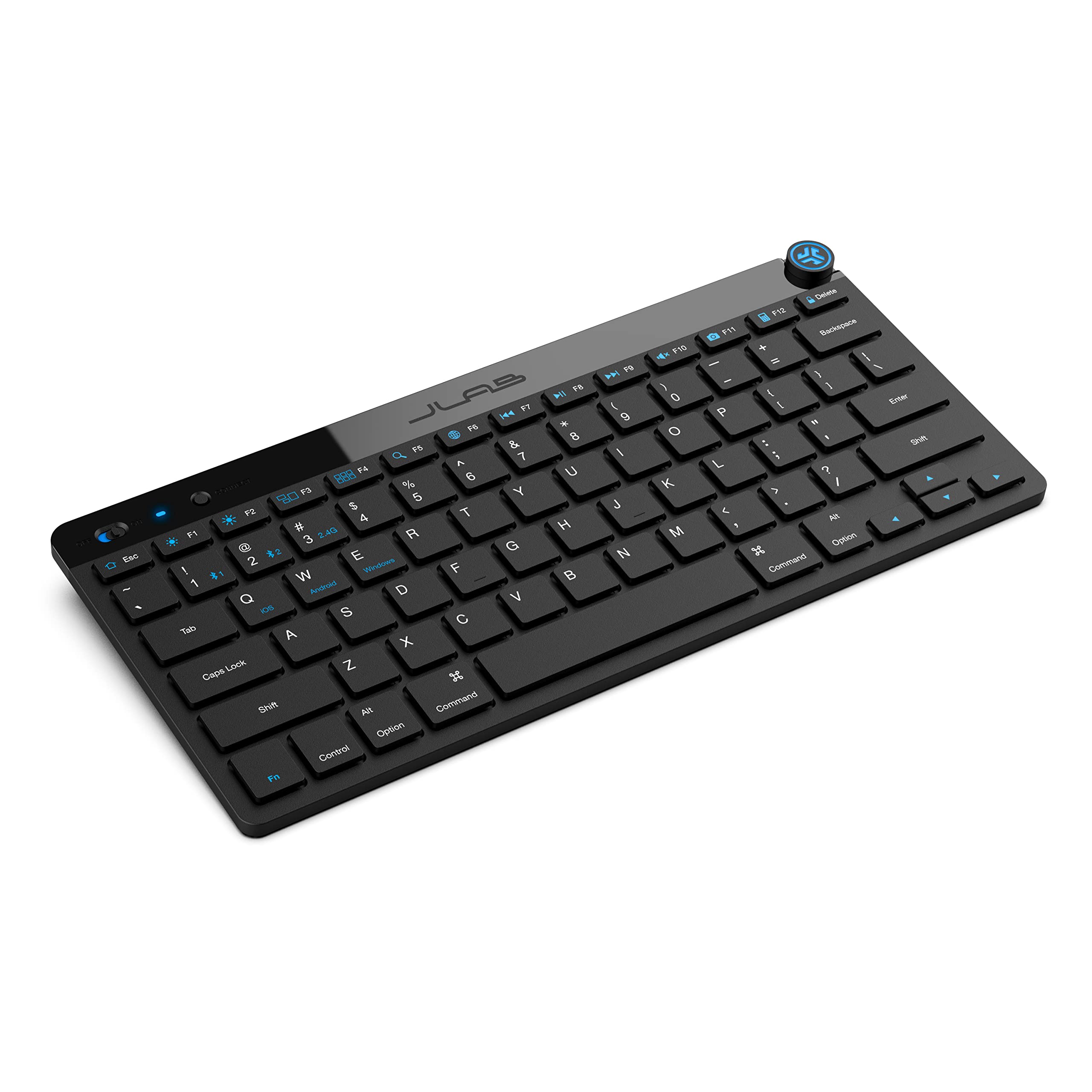
- The compact, low-profile keys are intended for quiet, comfortable typing.
- Bluetooth 5.0 and a USB dongle support up to three saved device connections.
- The offer comes as a four-pack for multiple desks or users.
Best For: A team or shared workspace needing several compact keyboards for laptops, tablets, or phones.
SOLAKAKA A99 Pro Mechanical Keyboard
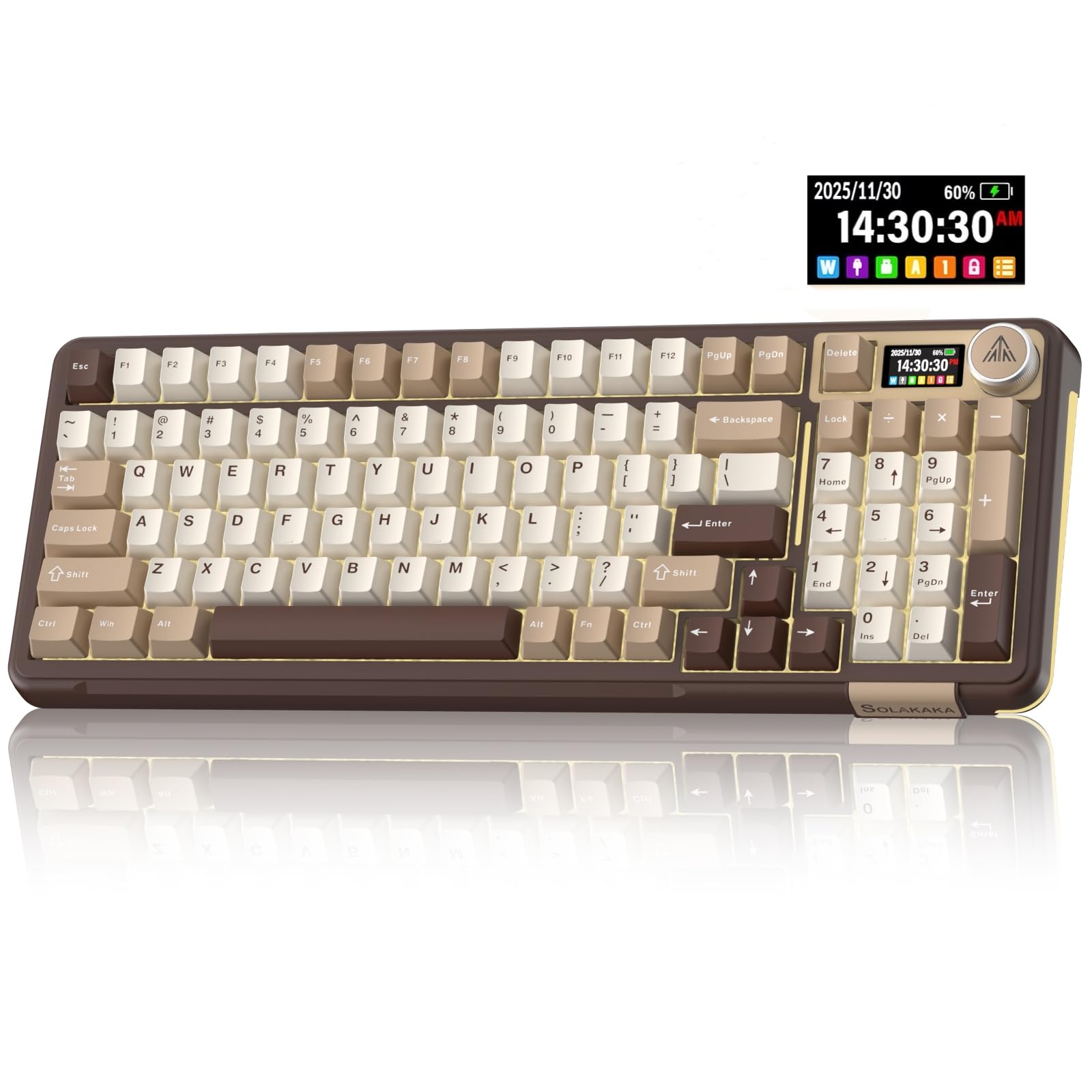
- Tri-mode connectivity supports Bluetooth, 2.4GHz wireless, and USB-C.
- The screen displays battery level and connection mode.
- The keyboard supports 3/5-pin hot-swappable switches, and a keycap puller is included for replacements.
Best For: A multi-device user who wants hot-swappable mechanical keys, a compact number pad layout, and status information.
SOLAKAKA A99 Pro Wireless Keyboard
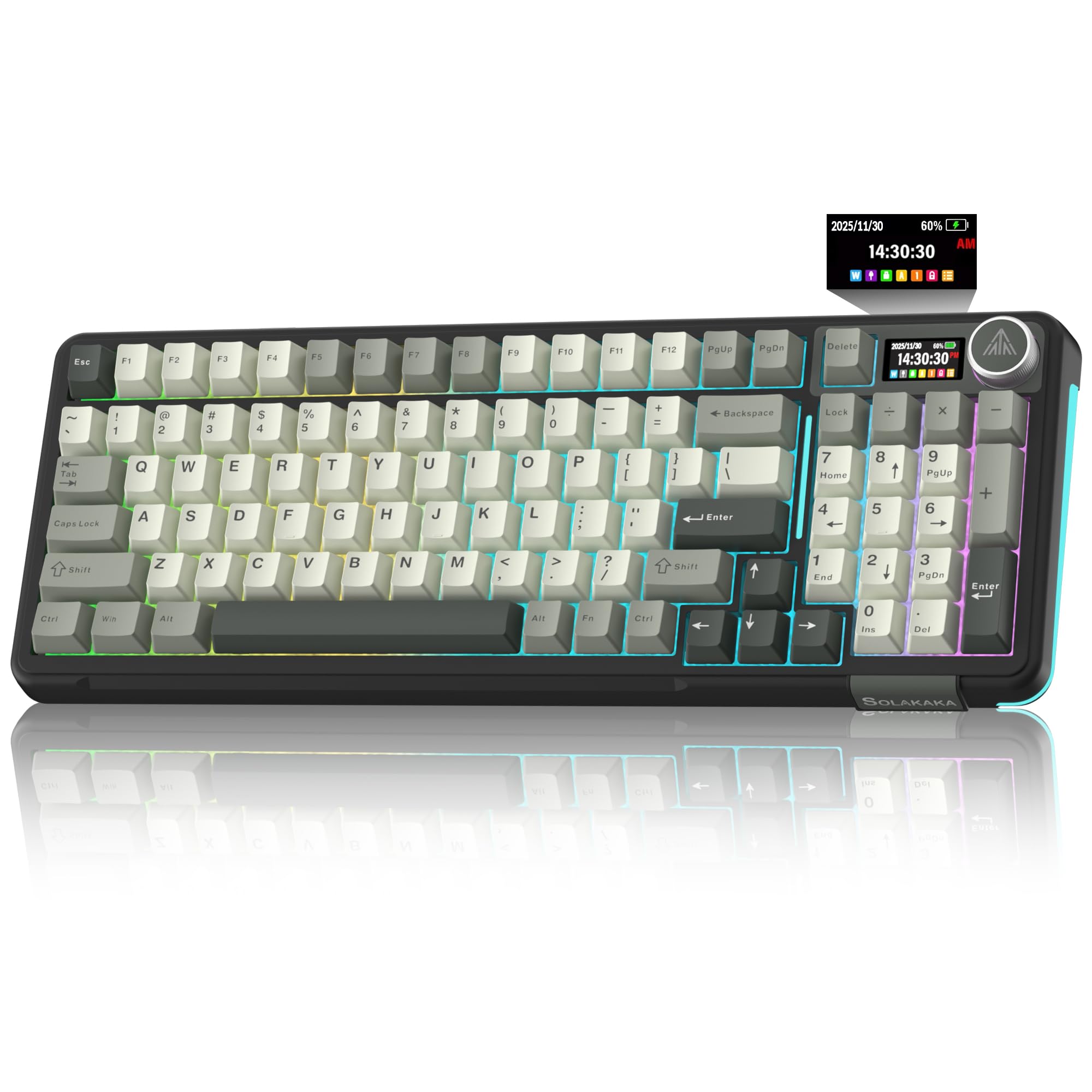
- The 97-key layout retains a keypad, arrows, and essential function keys.
- It offers Bluetooth, 2.4GHz wireless, and USB-C wired modes.
- The LCD screen displays battery and connection information.
Best For: People who need a compact number pad layout and frequent connections across several devices.
SOLAKAKA A99 Pro Wireless Gaming Keyboard
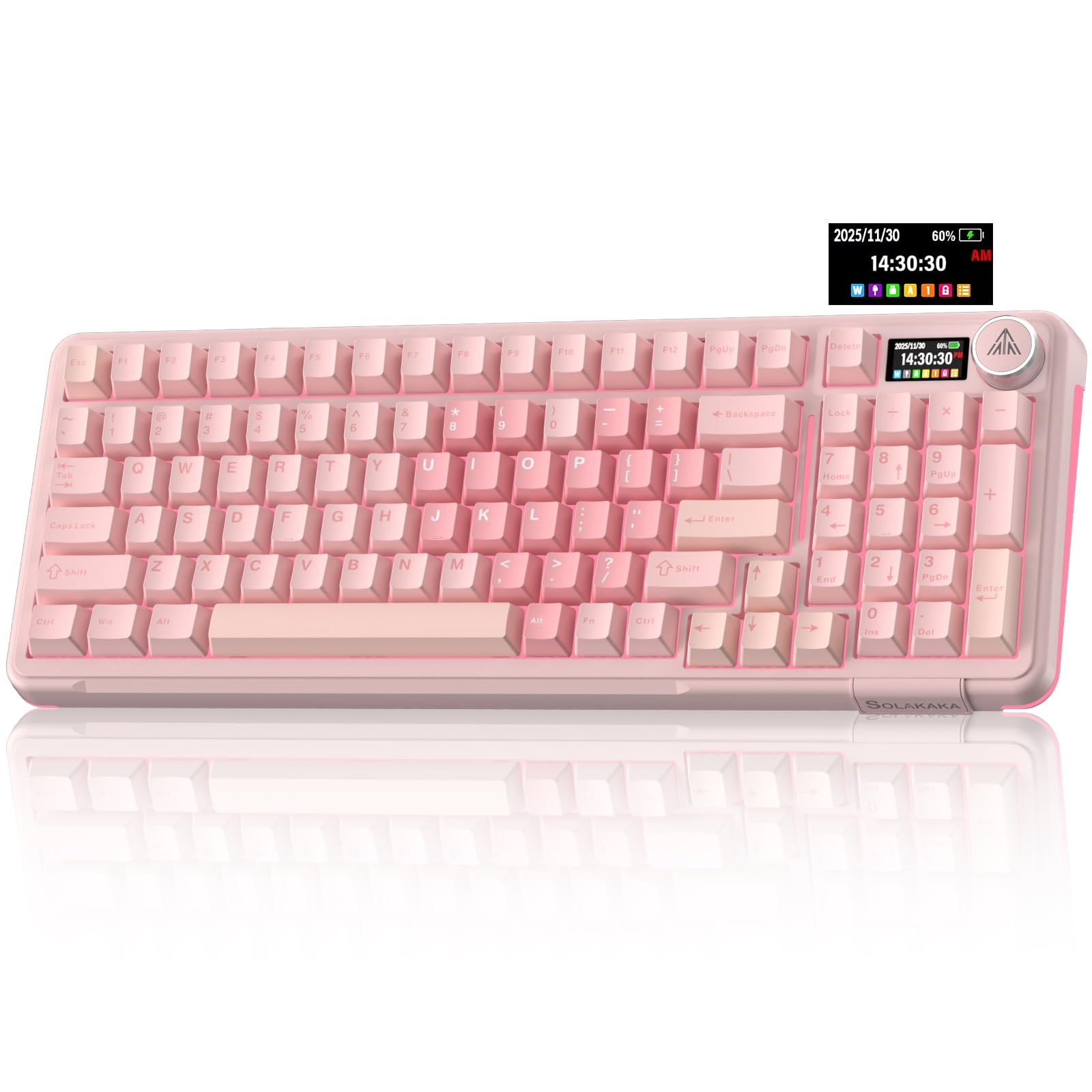
- It has a 97-key layout with number pad, arrows, and essential function keys.
- The LCD screen and metal knob provide status and direct controls.
- Its hot-swap system supports 3- and 5-pin switches.
Best For: A Windows or Mac user who wants a number pad, programmable controls, and wireless connection choices.
Full-Size Layout With Backlighting
JLab, Epic, Wireless Keyboard, Bluetooth 5.2, USB Dongle, Multi-Device, Backlit, 108 Keys, Black
The JLab Epic keeps a conventional 108-key full-size layout, with backlighting across all keys and a smart media knob for audio volume. Soft-touch keys are intended for a comfortable, quiet typing feel, while the metal base is described as adding desk stability.
Bluetooth 5.2 pairs with up to three devices, and a USB wireless dongle provides another connection option. Its rechargeable 2000 mAh battery is specified, though the notes do not give a runtime.
The broad layout is useful for spreadsheet work and regular number entry, provided you have room for a full-size keyboard.
Best For: People who want a full numeric layout, low-light visibility, and controls for several devices.
| Pros | Cons |
|---|---|
|
|
Consider this if you want a full-size keyboard with illuminated keys and frequently switch between devices. It adds a metal base and media knob, while the rechargeable battery avoids routine disposable-battery replacement.
The key tradeoff is that the notes give battery capacity but no runtime, so expected charging frequency is unclear. Check that your desk can accommodate a full-size layout, and decide whether Bluetooth or the dongle best fits the computers you use.
Quiet Wired Keys With a Wrist Rest
SteelSeries Apex 3 RGB Gaming Keyboard – 10-Zone RGB Illumination – IP32 Water Resistant – Premium Magnetic Wrist Rest (Whisper Quiet Gaming Switch)
The Apex 3 is a wired gaming-style keyboard with features that can transfer neatly to a work desk: whisper-quiet switches, dedicated multimedia controls, and a magnetic wrist rest. Its 10-zone RGB lighting is an optional visual feature rather than a work requirement, while IP32 water resistance is specified as protection against accidental liquid spills.
The title identifies the switches as tactile and silent. This full-size model makes sense if a number pad and a cushioned palm rest are priorities, and if wireless connectivity is unnecessary.
Its water-resistance detail should not be treated as protection against every kind of spill or exposure.
Best For: A stationary desk user who favors quiet typing, a wrist rest, and dedicated media controls.
| Pros | Cons |
|---|---|
|
|
This fits a fixed workstation where quieter typing, direct media controls, and an included wrist rest matter more than portability. The water-resistance rating may add some peace of mind around accidental spills, but it should not be read as a waterproof rating.
The notes do not identify its connection type or dimensions, so confirm those details and available desk space before choosing it. Its RGB lighting and gaming positioning may be unnecessary if you want a plain office keyboard.
Compact Quiet Board With Media Roller
SteelSeries Apex 3 TKL RGB Gaming Keyboard – Tenkeyless Compact Form Factor - 8-Zone RGB Illumination – IP32 Water & Dust Resistant – Whisper Quiet Gaming Switch – Gaming Grade Anti-Ghosting,Black
This tenkeyless Apex 3 drops the separate number pad to free space around the mouse and other desk items. Its whisper-quiet switches, anti-ghosting, and dedicated media controls are useful whether the keyboard is used for office tasks or gaming.
It also has IP32 water and dust resistance and customizable RGB lighting. The product record does not provide its dimensions or identify a wrist rest, so check the physical fit and included accessories if those matter.
Its compact layout works best for people comfortable entering numbers without a dedicated keypad.
Best For: A desk worker who wants a smaller footprint and quiet switches but does not need a number pad.
| Pros | Cons |
|---|---|
|
|
Choose the TKL version if desk space is tight and you rarely use a dedicated number pad. Its quiet switches and media roller keep the core work controls accessible in a more compact layout.
The tradeoff is clear for number-heavy work: you would need to use the number row or a separate keypad. Verify the keyboard's physical dimensions and cable arrangement for your desk, since those details are not supplied here.
Compact Wireless Board for Multi-Device Desks
JLab Go Wireless Keyboard, Bluetooth and USB dongle, Multi-Device, Compact, Black (4 Pack)
The JLab Go is a compact, low-profile wireless keyboard offered as a four-pack, making it especially relevant for outfitting several desks or keeping keyboards with multiple devices. It connects through Bluetooth 5.0 or a USB wireless dongle and saves up to three device connections for switching.
Its 78-key layout is quiet and comfortable according to the product details, and the keyboard is described as lightweight for travel or minimal workspaces. The notes mention batteries but do not specify runtime or whether they are rechargeable.
Consider it when a compact footprint matters more than a numeric keypad.
Best For: A team or shared workspace needing several compact keyboards for laptops, tablets, or phones.
| Pros | Cons |
|---|---|
|
|
This is a sensible fit for a team, classroom, or household that can use several keyboards and values a compact, lightweight design. Bluetooth and the dongle option cover common device setups, and saved connections ease switching.
The four-pack is a poor fit if you only need one keyboard, and there is no dedicated number pad in the listed 78-key layout. Check package contents and battery details before relying on the dongle or planning long intervals between battery changes.
Wireless Mechanical Board With Status Screen
SOLAKAKA A99 Pro Mechanical Keyboard with LCD Screen & Metal Knob, Wireless Gaming Keyboard with BT5.0/2.4GHz/USB-C, Hot Swappable Creamy Keyboard, Gasket Structure, RGB Backlit, for Win/Mac
The A99 Pro combines tri-mode connectivity with a mechanical layout that retains a numeric keypad while saving desk space. Its LCD screen displays items such as battery level and connection mode, and a metal knob controls functions including volume and lighting.
The keyboard supports up to five devices and hot-swappable switches, with a keycap puller included for replacements. A gasket structure and five cushioning layers are intended to soften typing feel and reduce internal noise.
Consider it if you want customization and wireless flexibility; confirm the exact layout and software support for your computer before buying.
Best For: A multi-device user who wants hot-swappable mechanical keys, a compact number pad layout, and status information.
| Pros | Cons |
|---|---|
|
|
Pick this if you want a number pad and wireless device switching alongside mechanical switch customization. Its screen makes battery and connection status visible, while the knob provides quick adjustments.
This is a more involved choice than a basic office keyboard: check whether you want a mechanical feel, and confirm software support for your operating system before relying on programmable functions. The notes do not give battery runtime, so the status screen cannot by itself establish how long it will run between charges.
96% Work Layout With Five-Device Switching
SOLAKAKA A99 Pro Wireless Mechanical Keyboard with LCD Screen & Metal Knob, 2.4GHz/BT5.0/USB-C, RGB Backlit Gaming Keyboard, Hot Swappable, Creamy Keyboard with Gasket Structure, for Win/Mac
This A99 Pro version has a 97-key, 96% layout that keeps a numeric keypad, arrow keys, and essential function keys while reducing space use. It supports Bluetooth 5.0, 2.4GHz wireless, and USB-C wired connections, with up to five devices supported.
An LCD screen shows battery and connection information, while the multifunction knob adjusts volume, lighting, and other settings. Its switches are hot-swappable, and the record specifies pre-lubricated LEOBOG star vector switches.
A gasket structure and five cushioning layers are intended to soften the typing feel and reduce internal noise. It suits a feature-rich workstation, though the notes do not specify battery runtime.
Best For: People who need a compact number pad layout and frequent connections across several devices.
| Pros | Cons |
|---|---|
|
|
This is a close fit for a workstation that benefits from number entry but has limited space for a full-size keyboard. Device switching and the three connection modes support varied setups, while hot-swapping suits buyers who want to change the typing feel later.
Check whether the preinstalled switch feel matches your preference and whether the listed connections fit your devices. Battery runtime and the included cable or dongle are not specified, so verify package needs before relying on wireless use.
96% Customizable Board With Onboard Controls
SOLAKAKA A99 Pro Wireless Gaming Keyboard with LCD Screen & Metal Knob, 96% Layout Mechanical Keyboard, 2.4GHz/BT5.0/USB-C, Hot Swappable, Creamy Keyboard with Gasket Structure, RGB, for Win/Mac
The A99 Pro offers a 96% layout with 97 keys, retaining a numeric keypad, arrow keys, and essential function keys in a space-saving arrangement. Bluetooth 5.0, 2.4GHz wireless, and USB-C wired connections provide flexibility, and the keyboard can support up to five devices.
Its LCD screen can show battery and connection information, while a metal knob provides direct access to lighting and volume controls. Full-key hot-swap support accepts 3- or 5-pin switches without soldering.
Programmable functions include key mapping and macros through a web driver. The supplied notes do not specify battery runtime, so check charging expectations as well as software compatibility.
Best For: A Windows or Mac user who wants a number pad, programmable controls, and wireless connection choices.
| Pros | Cons |
|---|---|
|
|
Choose this version if you value the combination of a compact number pad, status screen, and programmable functions. Its three connection modes can accommodate a mix of wired and wireless devices, and switch replacement offers room for later customization.
The notes identify compatibility with Mac but do not say whether the web driver runs there, so verify that before buying for macros or key remapping. Battery runtime is also absent; consider whether wired use is acceptable if charging frequency matters.
How to Choose Keyboards For Work
How We Picked Keyboards for Work
These options were chosen for work-relevant details in their product records: quieter key feel, useful number entry, compact layouts, wireless device switching, media controls, and practical customization. The list includes simple low-profile wireless boards, quiet wired tenkeyless choices, and mechanical models with connection flexibility or hot-swappable switches.
Gaming features appear on several candidates, but their work value depends on whether the keyboard also fits a real desk need, such as freeing mouse space or providing direct volume control.
Bundles can serve teams, but a multi-keyboard pack is a poor match for most individual desks. Duplicate offers of the same model are represented once, with preference given to the variant whose stated layout or features best match work use.
Comparing Keyboards for Work
Layout is the first practical split. Full-size or near-full-size choices such as the JLab Epic and JBuds keep a numeric pad, while the Apex 3 TKL and SOLAKAKA A75 save desk space by omitting some keys.
The A99 Pro models retain number entry in a 96% layout. If your work involves spreadsheets or frequent number entry, check the exact layout before choosing a compact board.
Connection needs are another differentiator. JLab's wireless models combine Bluetooth with a USB dongle and can switch among saved devices.
The SOLAKAKA A75 and A99 Pro add a wired USB-C mode and support several device connections. The SteelSeries Apex 3 models are better considered for a fixed desk where quiet switches, media controls, and a wrist rest matter more than wireless flexibility.
Typing feel and noise also vary. The JLab models use soft-touch keys described as quiet, and the SteelSeries Apex 3 options emphasize whisper-quiet switches.
SOLAKAKA's mechanical boards bring hot-swappable switches and gasket structures, but the supplied facts do not establish that every version is quiet; the KI99 silent-switch variant is particularly relevant, though excluded here as a duplicate family. For shared spaces, check the specific switch type rather than assuming all mechanical keyboards sound alike.
Extra controls matter most when they remove a repeated step. Media knobs on JLab and some SOLAKAKA models adjust sound directly, while the A99 Pro screen displays battery and connection details.
Programmable profiles and macros can help with repetitive tasks, but software compatibility varies; the A75 driver, for example, is specified for Windows and wired use.
| Product | Standout features | Best for |
|---|---|---|
| JLab Epic Wireless KeyboardCheck Price |
| People who want a full numeric layout, low-light visibility, and controls for several devices. |
| SteelSeries Apex 3Check Price |
| A stationary desk user who favors quiet typing, a wrist rest, and dedicated media controls. |
| SteelSeries Apex 3 TKLCheck Price |
| A desk worker who wants a smaller footprint and quiet switches but does not need a number pad. |
| JLab Go Wireless KeyboardCheck Price |
| A team or shared workspace needing several compact keyboards for laptops, tablets, or phones. |
| SOLAKAKA A99 Pro Mechanical KeyboardCheck Price |
| A multi-device user who wants hot-swappable mechanical keys, a compact number pad layout, and status information. |
| SOLAKAKA A99 Pro Wireless KeyboardCheck Price |
| People who need a compact number pad layout and frequent connections across several devices. |
| SOLAKAKA A99 Pro Wireless Gaming KeyboardCheck Price |
| A Windows or Mac user who wants a number pad, programmable controls, and wireless connection choices. |
Choosing a Keyboard Layout for Office Tasks
A number pad helps with data entry, finance tasks, and repeated numeric input. The JLab JBuds pairs one with a 95-key slim format, and the Epic provides a full-size 108-key arrangement.
SOLAKAKA's A99 Pro 96% layout retains a keypad and arrow keys while reducing the overall key count. Check the actual layout image or product specifications if you rely on navigation keys or function-row shortcuts.
A tenkeyless board removes the separate keypad, while a 75% layout cuts more keys but can preserve arrow keys. These smaller forms can leave more room for a mouse or notebook.
They require comfort with layered shortcuts or a separate keypad for number-heavy work. Physical dimensions are not provided for every candidate, so confirm available desk space before ordering.
Wireless, Wired, and Multi-Device Work Setups
Bluetooth is convenient for laptops and tablets, while a USB dongle can be useful where you prefer a dedicated wireless receiver. A wired USB-C mode avoids relying on a wireless connection and can matter when configuring software, as with the A75 driver.
Multi-device pairing is useful if you regularly switch between a work computer and a personal device; compare how many saved connections each model supports and whether it uses a shortcut or a physical selector.
Battery details deserve a close look. The JBuds is rated for up to 30 days of wireless use, while the Epic gives a 2000 mAh capacity without a runtime.
Some mechanical options show a battery level on an LCD but do not state how long they run. If frequent charging would disrupt your routine, favor a model with a stated runtime or plan to use its wired mode.
Who Should Buy Which Keyboard for Work
For a quiet individual workstation with a number pad and wireless switching, the single JLab JBuds has a straightforward work-focused feature set. Choose the JLab Epic if you prefer full-size backlit keys and a metal base, but check battery expectations.
For fixed desks where spill resistance, a wrist rest, and quiet typing matter, consider the SteelSeries Apex 3; choose the TKL only if losing the dedicated keypad suits your work.
For a compact wireless mechanical setup, the SOLAKAKA A75 preserves arrow keys and offers three connection modes, while its software is limited to Windows and wired use. If you need a number pad in a smaller footprint, consider an A99 Pro variant and check its software and battery details.
Teams equipping multiple desks may find the JLab four-pack or 16-pack relevant, but individual buyers should compare bundle quantities carefully.