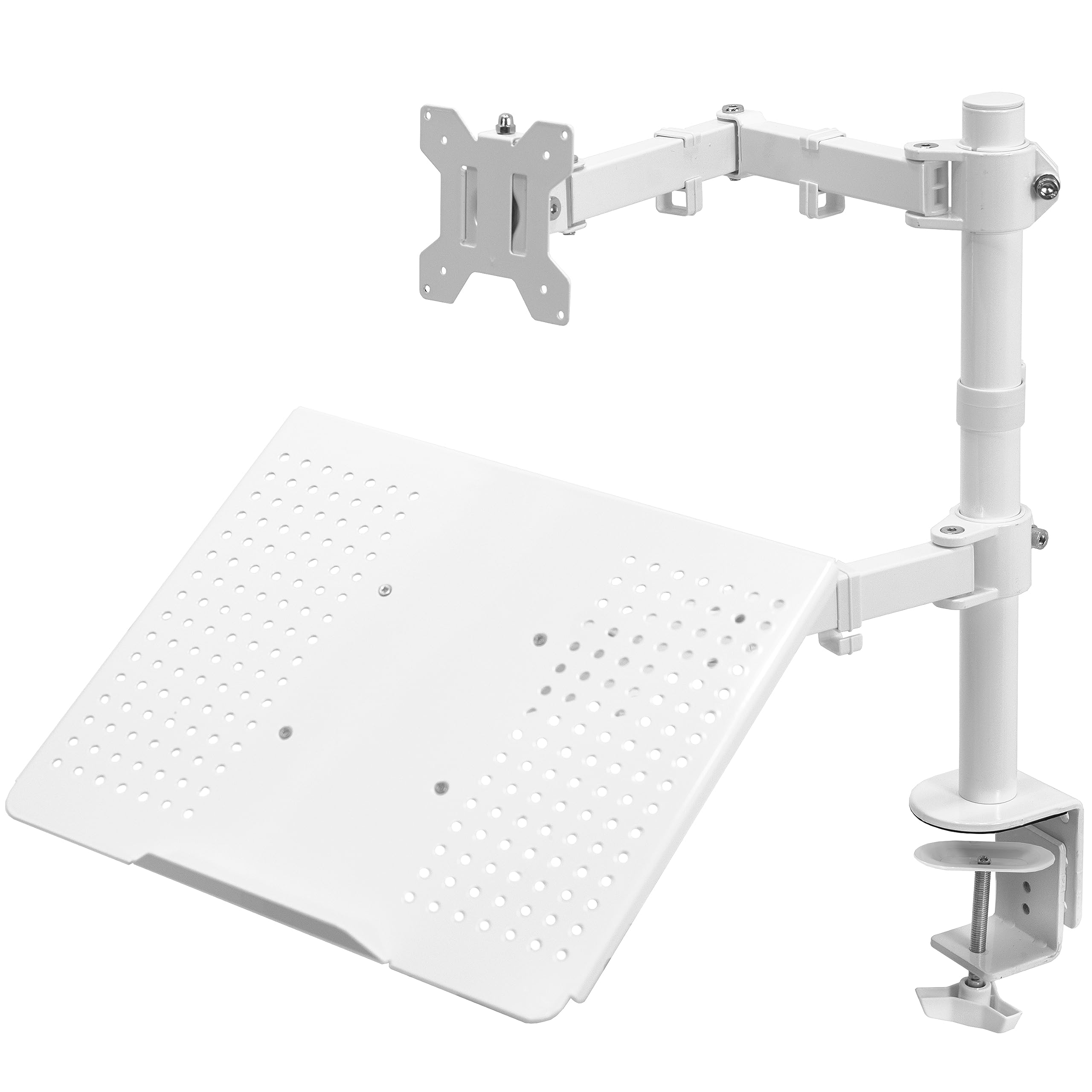
The VIVO Dual Screen Stand pairs a monitor arm with a vented laptop tray, giving a mixed-screen workstation one shared support point.
This VIVO Dual Screen Stand review looks at its compatibility, adjustment range, mounting choices, and the desk checks that matter before buying.
VIVO Dual Stand Review Summary
The quick verdict
3,000+ ratings
Read Amazon ReviewsVIVO Dual Screen Stand
A desk-mounted option for buyers who want to position one monitor and a laptop while keeping more desktop space clear.
- Monitor support for screens from 13 to 32 inches, with a maximum weight of 22 pounds and 75×75 mm or 100×100 mm VESA mounting holes.
- Vented tray for a laptop up to 17 inches.
- Monitor adjustment includes +15° to −15° tilt, 180° swivel, 360° rotation, and height adjustment along the center pole.
- The monitor can be positioned in portrait or landscape orientation.

Pros
- Combines a monitor arm and laptop tray in one desk-mounted arrangement.
- Supports portrait or landscape monitor orientation and offers several kinds of adjustment.
Consider before buying
- The monitor must fit the stated size and weight limits and have a compatible VESA pattern.
- The laptop tray is limited to laptops up to 17 inches, so check your device’s dimensions and how you want it positioned.
Read the full review summary
This stand is designed for a workspace that uses both a monitor and a laptop.
Its monitor arm fits screens from 13 to 32 inches and up to 22 pounds when they have 75×75 mm or 100×100 mm VESA mounting holes; the separate vented tray accommodates laptops up to 17 inches.
Raising both devices from the desktop may free space for a keyboard, notebook, or other daily items.
The main appeal is the combination of a broadly adjustable monitor arm and a dedicated laptop platform, attached with a clamp or optional grommet mount. It suits people who want a dual-screen arrangement without mounting two monitors.
Check the monitor’s weight and VESA pattern, the laptop’s size, and whether the desk edge or grommet location works with your setup.
The buying factors
VIVO Dual Stand Scorecard
Editorial scores reflect listed features and buyer fit; they are not laboratory measurements or customer ratings.
Mixed-device usefulness
The monitor arm and laptop tray address a monitor-plus-laptop setup directly.
Monitor compatibility
It supports 13–32-inch monitors up to 22 pounds with either of two common VESA patterns.
Positioning range
Tilt, swivel, rotation, and center-pole height adjustment allow several viewing orientations.
Desk-space potential
A clamp or grommet installation lifts the monitor and laptop off the work surface.
Mounting flexibility
The C-clamp supports surfaces up to 3.4 inches thick, while the optional grommet mount supports up to 3 inches.
Cable organization
Detachable clips on the arms and center pole provide a route for power and AV cables.
Key Features and Specifications of VIVO Dual Stand
- Monitor support for screens from 13 to 32 inches, with a maximum weight of 22 pounds and 75×75 mm or 100×100 mm VESA mounting holes.
- Vented tray for a laptop up to 17 inches.
- Monitor adjustment includes +15° to −15° tilt, 180° swivel, 360° rotation, and height adjustment along the center pole.
- The monitor can be positioned in portrait or landscape orientation.
- Mounting options include a heavy-duty C-clamp for surfaces up to 3.4 inches thick or an optional grommet mount for surfaces up to 3 inches thick.
- Detachable cable clips attach to the arms and center pole; detachable VESA plates and assembly hardware are included.
Pros and Cons of VIVO Dual Stand
Pros
- Combines a monitor arm and laptop tray in one desk-mounted arrangement.
- Supports portrait or landscape monitor orientation and offers several kinds of adjustment.
- Provides both clamp and optional grommet installation options.
- Detachable cable clips help route power and AV cables along the mount.
Consider before buying
- The monitor must fit the stated size and weight limits and have a compatible VESA pattern.
- The laptop tray is limited to laptops up to 17 inches, so check your device’s dimensions and how you want it positioned.
- Installation depends on a suitable desk edge or grommet location, with different thickness limits for each option.
Who Should Buy VIVO Dual Stand?
Good fit
Consider the VIVO Dual Screen Stand if your regular setup combines one VESA-compatible monitor with a laptop and you want both supported above the desk.
Its tilt, swivel, rotation, and height adjustment give you ways to arrange the monitor for your seating position, while the tray creates a place for the laptop alongside it.
It is especially relevant when clearing desktop space is a priority and your desk can accept a clamp or grommet mount.
Before choosing it, confirm the monitor stays within the 13-to-32-inch and 22-pound limits, check its VESA hole spacing, and verify the laptop is no larger than 17 inches.
The two mounting methods give some flexibility around desk layouts. Measure the surface thickness at the intended attachment point: the C-clamp accommodates up to 3.4 inches, and the optional grommet mount accommodates up to 3 inches.
Who should skip it
Skip this configuration if you need a stand for two external monitors: its second support is a laptop tray, not a second monitor arm.
Also look elsewhere if your monitor falls outside the listed size, weight, or VESA limits, or if your desk has no workable clamp or grommet location.
How the VIVO Dual Stand Fits a Mixed-Screen Desk
One monitor, one laptop
The layout is tailored to people who use a laptop alongside a separate monitor. The tray holds laptops up to 17 inches, while the monitor arm supports a screen up to 32 inches and 22 pounds.
This creates an option for keeping both displays in view without dedicating the mount’s second position to another external monitor.
Adjustment for the monitor
The arm offers tilt from +15° to −15°, 180° of swivel, full 360° rotation, and height adjustment along the center pole.
Those movements allow the screen to be turned or angled for different tasks, and the stated portrait or landscape positioning can be useful when applications or documents suit a vertical display.
Desk fit is part of compatibility
The C-clamp attaches to a surface up to 3.4 inches thick.
An optional grommet mount supports a surface up to 3 inches thick, so buyers should measure the intended mounting point and confirm that the chosen method fits their desk before assembly.
A cleaner route for cables
Detachable clips on the arms and center pole can guide power and AV cables along the structure.
They help keep cables grouped around the mount, though the useful result depends on the number and routing of cables in your setup.
Alternatives to VIVO Dual Stand
Computer Monitor Arms alternative
60,000+ ratings
Read Amazon ReviewsVIVO Dual Monitor Desk Mount STAND-V002
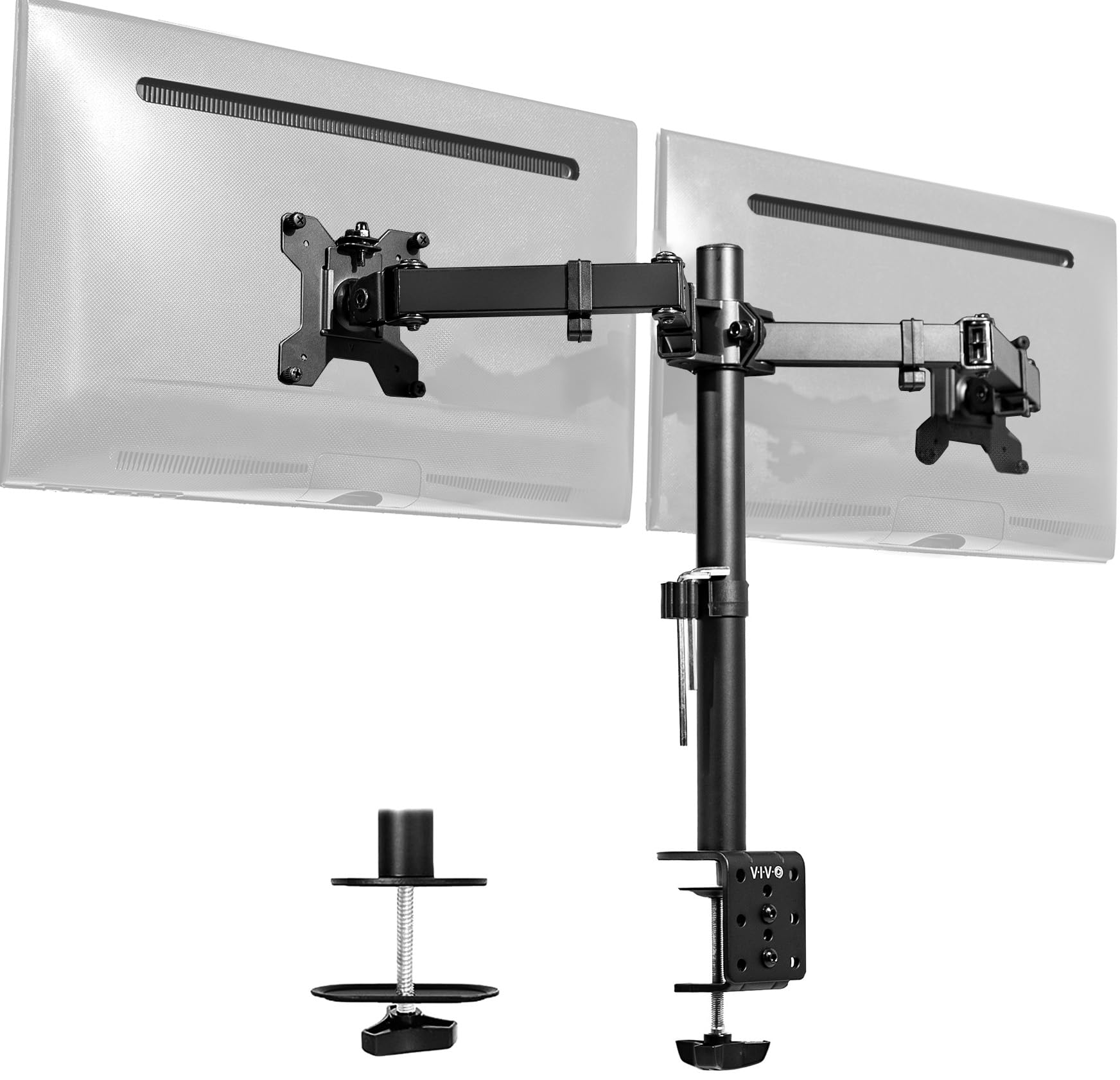
Choose this dual-monitor model if you need two external screens and do not need a laptop tray. Choose the VIVO Dual Screen Stand if your intended arrangement is one monitor plus one laptop.
- This VIVO mount supports two monitors, each 13 to 30 inches and up to 22 pounds, with 75×75 mm or 100×100 mm VESA holes.
- It offers +90° to −90° tilt, 180° swivel, 360° rotation, and clamp or optional grommet mounting.
- The VIVO Dual Screen Stand supports one monitor and a laptop, with monitor support up to 32 inches and a tray for laptops up to 17 inches.
Computer Monitor Arms alternative
34,000+ ratings
Read Amazon ReviewsHUANUO FlowLift Dual Monitor Stand
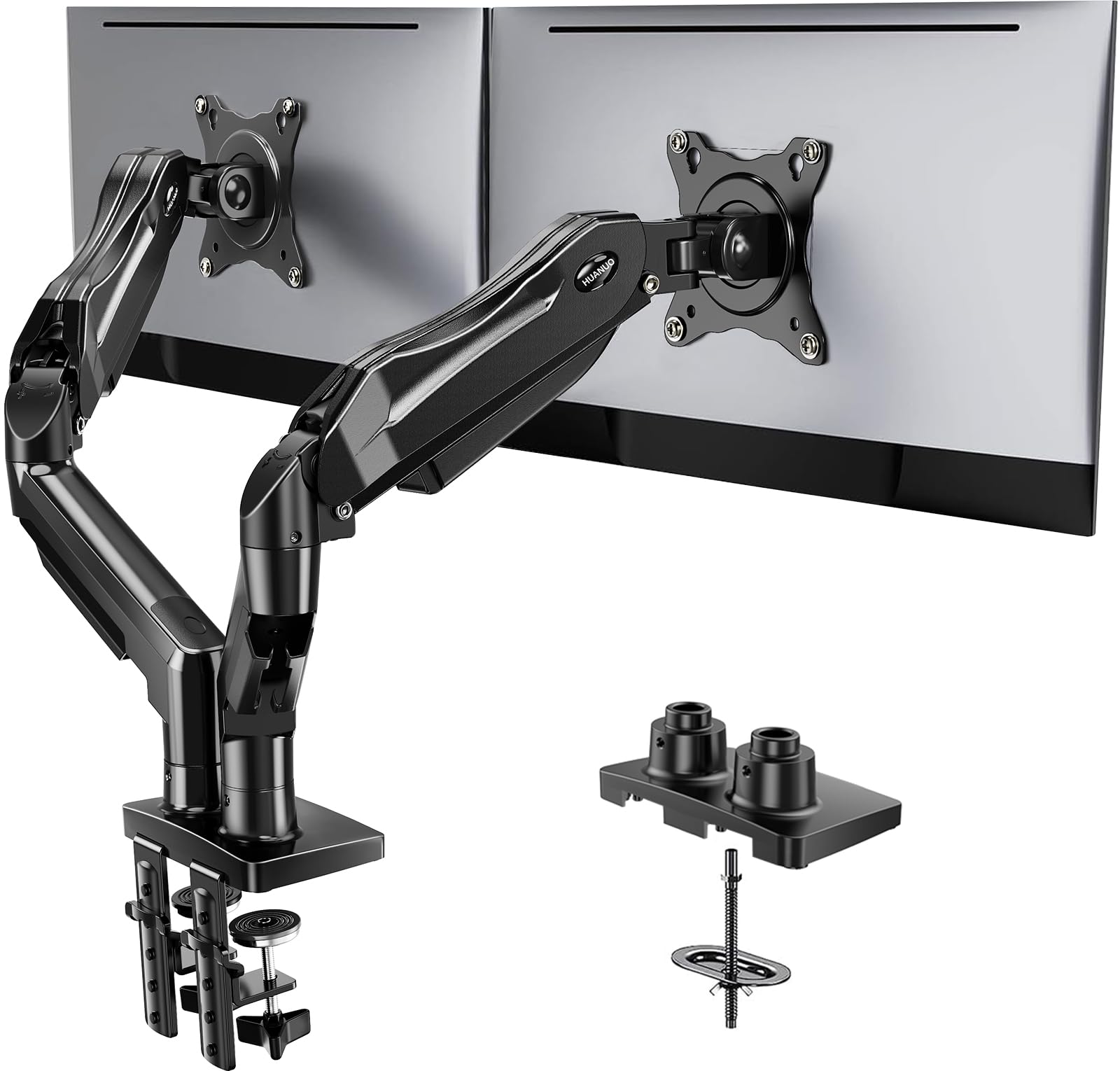
Consider the HUANUO FlowLift when you want two external monitors and your wooden desk meets its stated installation conditions. The VIVO Dual Screen Stand is the closer fit for a monitor-plus-laptop arrangement.
- The HUANUO FlowLift supports two 13-to-32-inch monitors weighing 4.4 to 19.8 pounds each, with 75×75 mm or 100×100 mm VESA patterns.
- Its product details specify wooden desks, a desk thickness of 0.59 to 3.54 inches, and no cross beams or panels beneath the desk; it offers clamp and grommet mounting.
- The VIVO Dual Screen Stand uses a monitor arm and a laptop tray, with monitor support up to 22 pounds and a stated screen-size range of 13 to 32 inches.
Is VIVO Dual Stand Worth It?
The VIVO Dual Screen Stand is worth considering if you want one monitor and one laptop mounted together and your devices and desk meet its fit requirements.
Its broad monitor positioning options, cable clips, and clamp or grommet mounting give a mixed-screen workspace flexibility.
Check the monitor’s VESA pattern, size, and weight; confirm the laptop fits the 17-inch tray limit; and measure the mounting point before buying. If your second display needs to be another monitor, choose a dual-monitor arm instead.
Your review at a glance
3,000+ ratings
Read Amazon ReviewsVIVO Dual Screen Stand
A desk-mounted option for buyers who want to position one monitor and a laptop while keeping more desktop space clear.
- Monitor support for screens from 13 to 32 inches, with a maximum weight of 22 pounds and 75×75 mm or 100×100 mm VESA mounting holes.
- Vented tray for a laptop up to 17 inches.
- Monitor adjustment includes +15° to −15° tilt, 180° swivel, 360° rotation, and height adjustment along the center pole.
- The monitor can be positioned in portrait or landscape orientation.